Trusted by students & professionals at
How PDF Text to Speech Works
Sign UpCreate an account and get started in under 60 seconds
Upload Your DocumentsDrag and drop to upload instantly. PDFs, Word docs, text, web articles, and more
Choose a Voice & ListenRelax and listen to your documents without the strain of reading
Get started for free today →
Get Started In Less Than 60 Seconds • Cancel Anytime
How to read & listen to PDFs online
Read aloud PDFs using text-to-speech (TTS) to convert PDFs to audio.- Upload the PDFs you want to read aloud
- Select your ideal reading voice and speed
- Press play and listen to your PDF aloud
Get Started for Free →
Get Started In Less Than 60 Seconds • Cancel Anytime
Get Started for Free →
Get Started In Less Than 60 Seconds • Cancel Anytime
What is a PDF to Audio Reader?
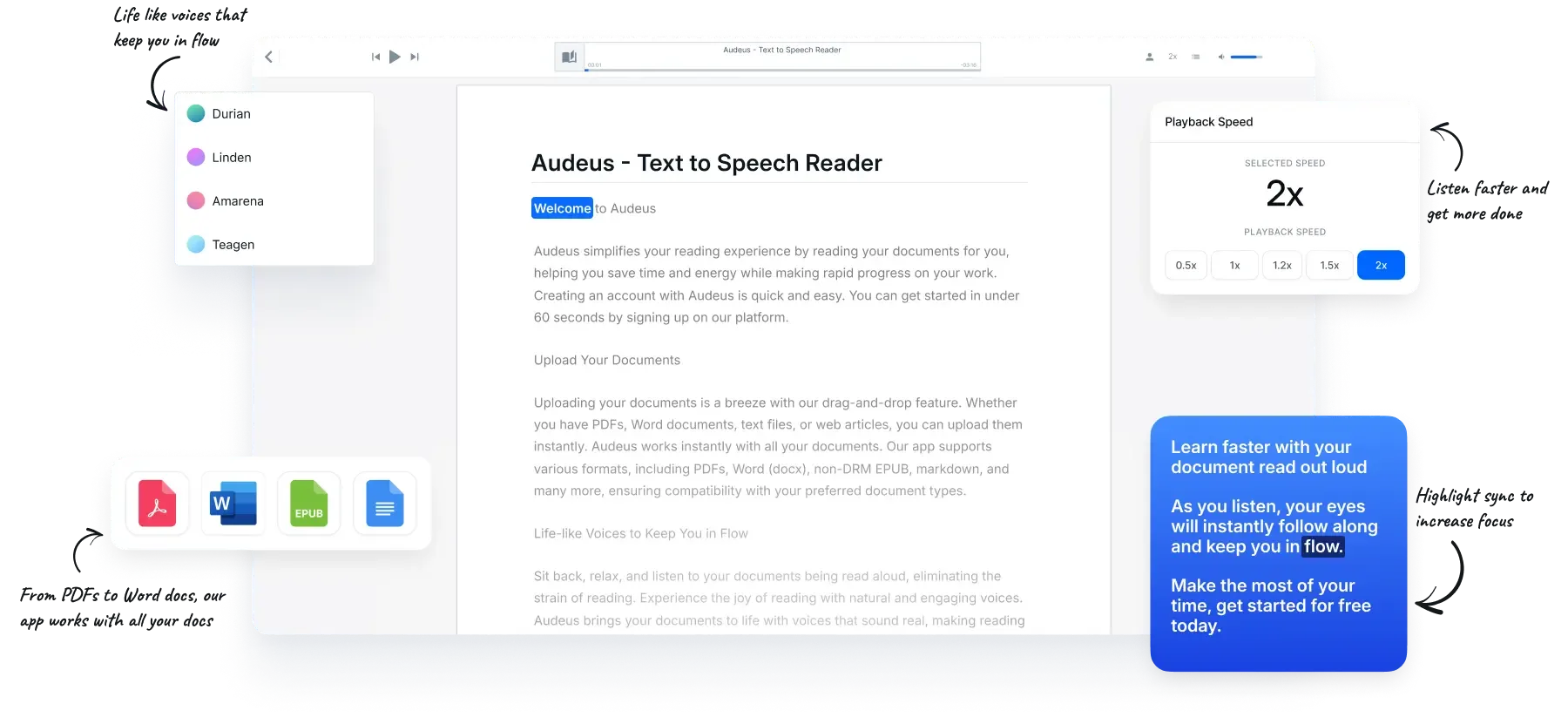
A PDF to Audio Reader is an app that uses text to speech to read your PDF files out loud. It works by looking at the content and structure of your PDF, and then generating the speech to read it out loud for you. This often involves filtering for text content that can interfere with the voiceover as well. PDF readers using text to speech often include syncing the text highlighter with the spoken audio so you can read along and focus a lot more easily.Natural AI Voices
Read your PDF aloud with lifelike voices
Bring your PDFs to life with natural, engaging voices- Enjoy reading PDFs with voices that sound real
- Read through your PDFs 2x faster instantly
- Have even technical terms in your PDFs read to you smoothly
- Get twice as much done & accelerate document review
Arden
English • American
Linen
English • American
Try it out
Sage
English • American
Sandalwood
English • British
Quillan
English • American
Learn faster with your document read out loud for you and follow along easily with the current highlighted text. As you listen, your eyes are able to follow the text so you can stay in flow. Make the most of your time and get started for free today.
Text Highlighting
Benefits using text to speech for PDFs
Benefits using text to speech for PDF- Comprehend and recall more of your readings by engaging both visual and auditory senses
- Stay laser-focused on your documents even in distracting and noisy environments
- Eliminate reading fatigue, word highlighting makes it easier to stay focused on your PDF
- Effortlessly follow along as your PDF text is being read aloud
- Customize the highlight color to personalize your PDF reader experience
- Reduce eye strain with synchronized highlighting while reading PDFs
Supported Files & Devices
Instantly works with all your documents
From PDFs to Word docs, our app works with your preferred formats. We support PDF, Word (docx), non-DRM EPUB, and much more!- Pick up where you left off, on any device
- Listen anywhere across iOS, Android and web
- Add PDFs, Word files, scans, screenshots, and more

Paste your text and press play
Paste & Listen
Type or paste your text
Paste or type any text directly into your notepad and start listening instantly. Perfect for reviewing quick notes, proofreading, and anything else. Just paste text and press play.- Instantly listen to pasted or typed text
- Write, edit, and listen without breaking your flow
- Catch run-on sentences and clunky phrasing instantly
- Proofread your drafts and finish with absolute confidence
Member Stories
Here’s what our members have to say about Audeus transforming their livesAnna
College Student
Audeus has helped me able to manage my time blindness and estimate my tasks way more easily, letting me gain an extra 2 productive hours per day. I have ADHD and with the reading time estimates I can now plan my day knowing how long a reading assignment will take. Ever since Audeus I've had so much more time and energy given back, letting me spend more time with friends and family.
Zain
Law Student
I'm a 2L currently and just found it so hard to give time to my SO, but with Audeus, I have been able to get 10 hours of my week back to now spend with my partner. I was just always just so tired and exhausted before, and Audeus has gotten me through the slog of readings and with that extra time I've been able to focus on job related work. I don't know what I'd do without Audeus.
amir04
Learning English
As an English learner who just moved to the US, I struggled with understanding native speakers and lacked confidence when talking at work. Audeus has been a huge boost to my confidence, as I've been able to listen to articles and my documents in English which has expanded my vocabulary. I'm able to express myself clearly, improved my accent, and don't feel self conscious anymore when speaking in public, especially at work.
lucskd
Graduate Student
I'm a slow reader and ever since using text to speech with audeus with 2x speed, I've been able to keep up with all my work. It's given me a massive boost in how much I get done, and overall I just feel so much more confident knowing I'm on track throughout the semester. Struggling and being behind in school had caused me massive anxiety, and feeling the weight be taken off just feels so great.
sajapk2
Undergrad Student
I was constantly overwhelmed with the amount of new readings and work I had to do my first semester of college. Ever since getting Audeus, I have been able to consistently study and realized I just needed to listen as well to keep myself engaged and learned much better than before. I've been able to consistently get good scores ever since I've started using text to speech.
Maria
Research Coordinator
Using audeus for editing my writing, reading journal articles, and using it for my overall editing process has helped a lot. Reading was so daunting for me, and keeping up after an hour was just too much, I feel like with Audeus I have basically just bought focus and it has helped me retain what I read much better. I am still surprised how effective Audeus is for me and highly recommend it.
dpgc023
Medical Student
I'm keeping up with the material without having to pull all-nighters anymore, and I don't have to stress about falling behind. My test scores have gone up and it helped me massively with my USMLE Step 1 exam.
Robin
Self Care
I was constantly doom scrolling and was overwhelmed with the amount of things I had to do, ever since using Audeus, I have been able to relax my eyes and give myself a bit of a break to listen and learn some of the self-care readings I had been putting off. I feel more present and more focused than ever, don't think that having to constantly read your screen is the only way to progress forward. I recommend Audeus to anyone who's currently overwhelmed and feels overloaded with work.
Get started for free today →
Get Started In Less Than 60 Seconds • Cancel Anytime
Frequently asked questions about our PDF reader
What is text-to-speech (TTS)?
Text-to-speech (TTS) is a technology that converts written text into spoken audio. Audeus uses TTS to read PDFs, Word documents, ebooks, and other text aloud while users follow along.
How can I benefit from text-to-speech?
Listening while reading can help improve focus, reduce reading fatigue, and make it easier to work through lengthy documents. Audeus helps students and professionals manage their reading tasks.
Will the app save my place in a document?
Yes, Audeus automatically saves your reading position so you can pause and resume listening without losing your place.
Will the app estimate how long a document will take to listen?
Yes, Audeus estimates the listening time for each document based on your selected playback speed, helping you plan your reading sessions.
Do I have to install anything?
You can use Audeus directly through a web browser without installing software. Mobile apps and browser extensions are also available.
How does the trial work? And will I be charged?
Audeus offers a 3-day trial of its Pro features at no cost. After the trial, the selected paid plan begins automatically unless canceled before the trial ends.
How do I cancel my Audeus subscription?
You can cancel your Audeus subscription through the settings menu within the app.
Can I rejoin Audeus if I change my mind?
Yes, you can log in to your account and reactivate your plan. Your files and preferences will be preserved.
What payment methods do you accept?
Audeus accepts all major credit cards, debit cards, Apple Pay, and Google Pay.
Do you offer volume-based pricing?
Yes, Audeus offers volume-based pricing for teams, businesses, and educational institutions. Contact the Audeus team to discuss customized pricing.
Will Audeus work on my phone, tablet, and computer?
Yes, Audeus is accessible through web browsers and offers mobile applications for iOS and Android devices.
Can I contact the team if I have any questions?
Yes, you can contact the Audeus team through the contact page on the official website.
Does your PDF Reader have the actual document view of the page and not just the extracted text content?
Yes, we prioritize the original view of the PDF because we know that PDFs are best read in how they are intended, and preserving their format and being able to do text to speech layered on top. Extracting the content from the PDF and rendering it differently than the original document is also another option, but we prioritize the original PDF reader experience given the range of PDFs that are available.
What should I look for in a PDF Text to Speech Reader?
Make sure that it includes word level sync text highlighting and the original view of the document as an option. We think that those are sensible defaults, PDF is a file format that when using extraction will not be perfect and interpreting and reading the actual document is closer to how an author often intends it. We always give the option to switch between both as mobile is better suited for different viewing preferences.
Why should I care about word text highlighting to layer on top of my document?
This increases engagement and keeps you in flow. Word level highlighting also refers to making sure the block is at the word level and not just the sentence level so your gaze is able to follow along the audio precisely. This helps with both focus and makes the experience more engaging vs. only having sentence level highlighting.
How to get a PDF to read aloud?
You can use a PDF reader that allows for text to speech. Audeus is a PDF reader that lets you listen to your PDFs and makes the experience engaging as you are able to customize playback speed, voices, and much more!
Which device is best for reading PDF?
The best device is the device you have, of course. We think for desktop, PDF is best, whereas on mobile, PDFs can often be hard to read in their original form and have to be transformed into a re-flowable format to adjust the text size and make it easier to read.
How do I read a PDF like an audiobook?
You can use the Audeus PDF to audio app to listen to your PDF documents out loud. We have many people do this to get their reading assignments done faster and rest their eyes. Our app is an AI that can read PDFs out loud to you.
Get your new superpower today
Get started for free today →
Get Started In Less Than 60 Seconds • Cancel Anytime