Customize Word-by-Word Highlighting
Audeus uses a synchronized visual highlighting system that perfectly aligns spoken audio narration with your text. This bimodal reading approach (combining visual tracking with auditory speech) anchors your attention, improves text recall, and trains your eyes to read faster.
By default, Audeus highlights the active sentence with a soft, subtle background color and highlights the exact spoken word with a high-contrast accent color in real-time. You can customize these overlay settings to match your reading preferences on the Web Reader and Browser Extension.
Highlighting Customization on the Web Reader
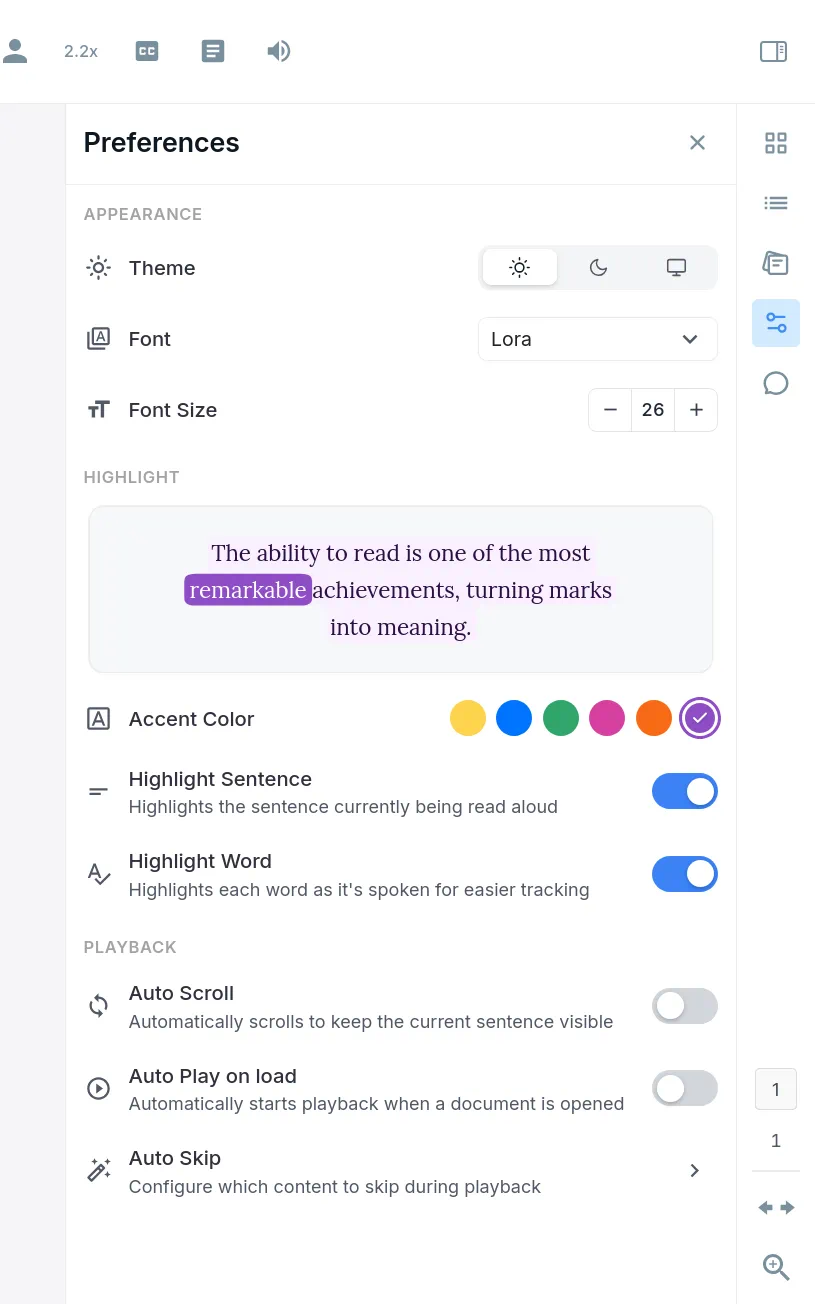
On the Web Reader, you can adjust highlighting settings directly inside the Preferences panel on the side menu. Open any document, click the Preferences icon (represented by the sliders control adjustments icon) in the sidebar, and scroll down to the Highlight section:
Customization Options
- Highlight Preview: A live interactive text box displays how your selected highlight styling appears on the page. Use this preview to evaluate contrast before starting playback.
- Accent Color: Select from a row of color options, including Highlighter (yellow), Blue, Green, Pink, Orange, and Purple. Choosing a color applies a balanced dual-layered color scheme to both sentences and words.
- Highlight Sentence: Toggle this switch to show or hide the soft background highlight overlay that outlines the current active sentence.
- Highlight Word: Toggle this switch to enable or disable the bright word-level highlighting that advances word-by-word as the narrator speaks.
Highlighting Customization on the Browser Extension
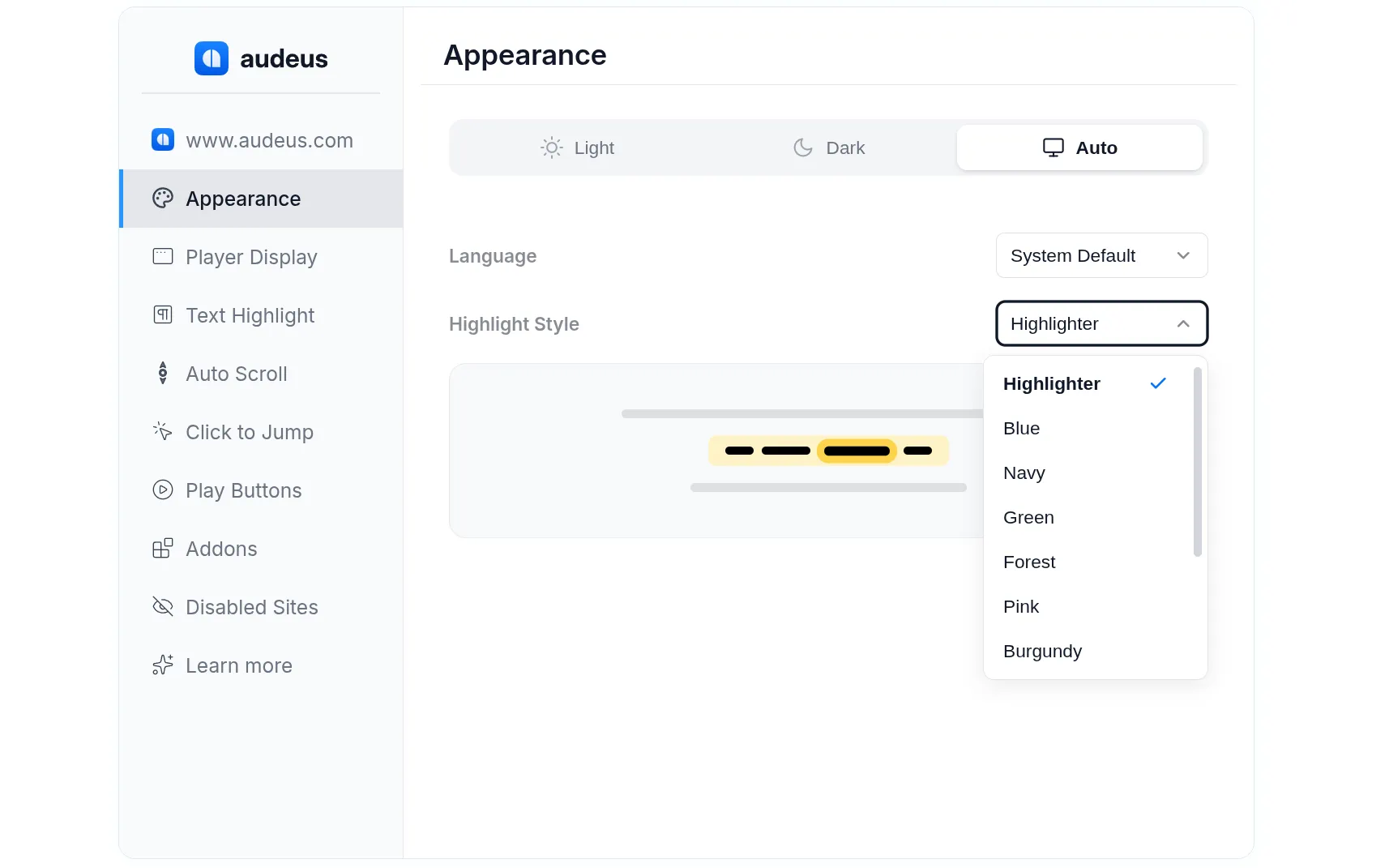
For reading web articles, news, and emails, the Browser Extension features dedicated settings to control highlighting on any page. To access these settings, click the Gear (Settings) icon in the main extension player pill, and then click the Text Highlight tab in the sidebar menu:
Customization Options
- Highlighter Style presets: Choose from a wide selection of pre-configured styling palettes designed to contrast perfectly with both light and dark web pages. Available presets include Highlighter, Blue, Navy, Green, Forest, Pink, Burgundy, Orange, Rust, Purple, and Plum.
- Highlight Sentence: Turn this switch on or off to control whether the sentence background overlay is displayed on the web page.
- Highlight Word: Turn this switch on or off to enable or disable the real-time word-level tracking.
Frequently Asked Questions
Can I turn visual highlighting completely off?
Yes. If you prefer to listen to your documents without any moving visual overlays, you can turn off both the Highlight Sentence and Highlight Word toggles. This allows Audeus to narrate your text in the background while leaving the visual page layout completely clean.
Does highlighting work on original PDFs and scanned documents?
Yes. Audeus maps the coordinate text layer of your uploaded documents. During playback, the visual highlighting overlays align directly on top of the original document layout, highlighting sentences and words as they are read.
Do my highlighting styles sync between my devices?
Yes. Your chosen highlighting accent color and settings are saved to your global user profile. When you customize your styles on the web reader, those configurations are applied automatically the next time you use the browser extension.
How does bimodal reading with highlighting support readers with dyslexia or ADHD?
By presenting text visually and audibly at the same time, bimodal reading reinforces word recognition and visual tracking. The active sentence highlight acts as a structural anchor, keeping your eyes focused on the current paragraph, while the rapid word-by-word highlight guides your visual focus in real-time. This combination drastically reduces page distractions, prevents backtracking, and raises overall reading comprehension for individuals with learning differences, ADHD, dyslexia, or visual processing preferences.
Does the highlighting remain synchronized at high playback speeds?
Yes. Whether you are listening at a comfortable 1.0x rate or speed-reading at 3.0x, the Audeus text tracking engine is engineered to sync the visual highlights with the voice narrator in real-time. The active word highlight jumps forward instantly to match the spoken audio, making it a perfect training tool for speed-listening and quick scanning.