Smart Skips: Uninterrupted Reading
Nothing disrupts an immersive text-to-speech reading session faster than an AI voice pausing to read aloud a 100-character web address, a complex algebraic calculation, or a lengthy academic citation bracket. If you are reading research papers, textbooks, or Wikipedia articles, these distractions can ruin your visual focus and comprehension.
Audeus features a powerful Smart Skips engine built to provide uninterrupted reading. By automatically filtering layout clutter and inline citations, Audeus ensures a smooth, continuous narrative flow. This distraction-free reading tool is fully supported across both the Web Reader and the Mobile App (available for the iOS App and Android App).
How to Configure Smart Skip Settings
You can customize your narration filters and toggle specific elements on or off to suit your preferences:
Accessing Settings on the Web Reader
- Open any document inside the Web Reader.
- Click the sliders control adjustments icon in the top toolbar to open the Preferences panel.
- Scroll down and click on the Auto Skip row to enter the detailed settings menu.
- Toggle your preferred layout and character filters.
Accessing Settings on the Mobile App
- Open any document inside the Mobile App reader.
- Tap the More Settings (Three-Dots) icon on the reader screen to open the bottom sheet.
- Tap Auto Skip details.
- Toggle your desired switches on or off.
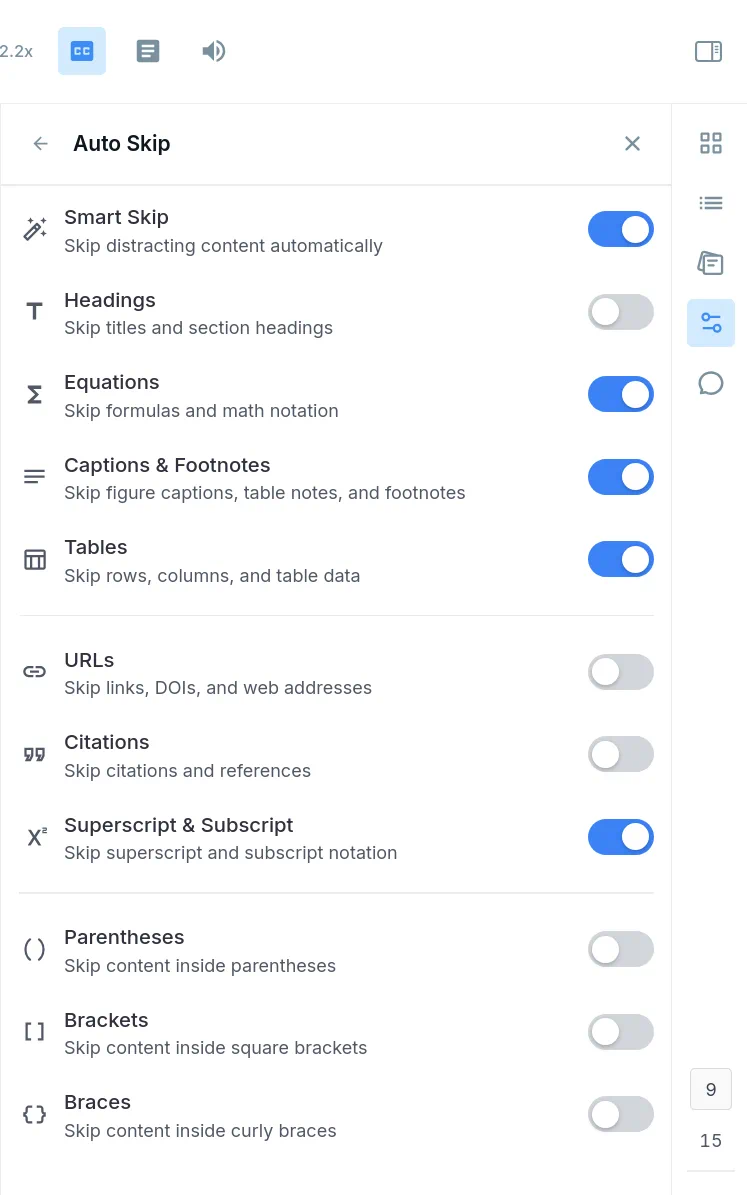
Smart Skip & Document Layout Skips
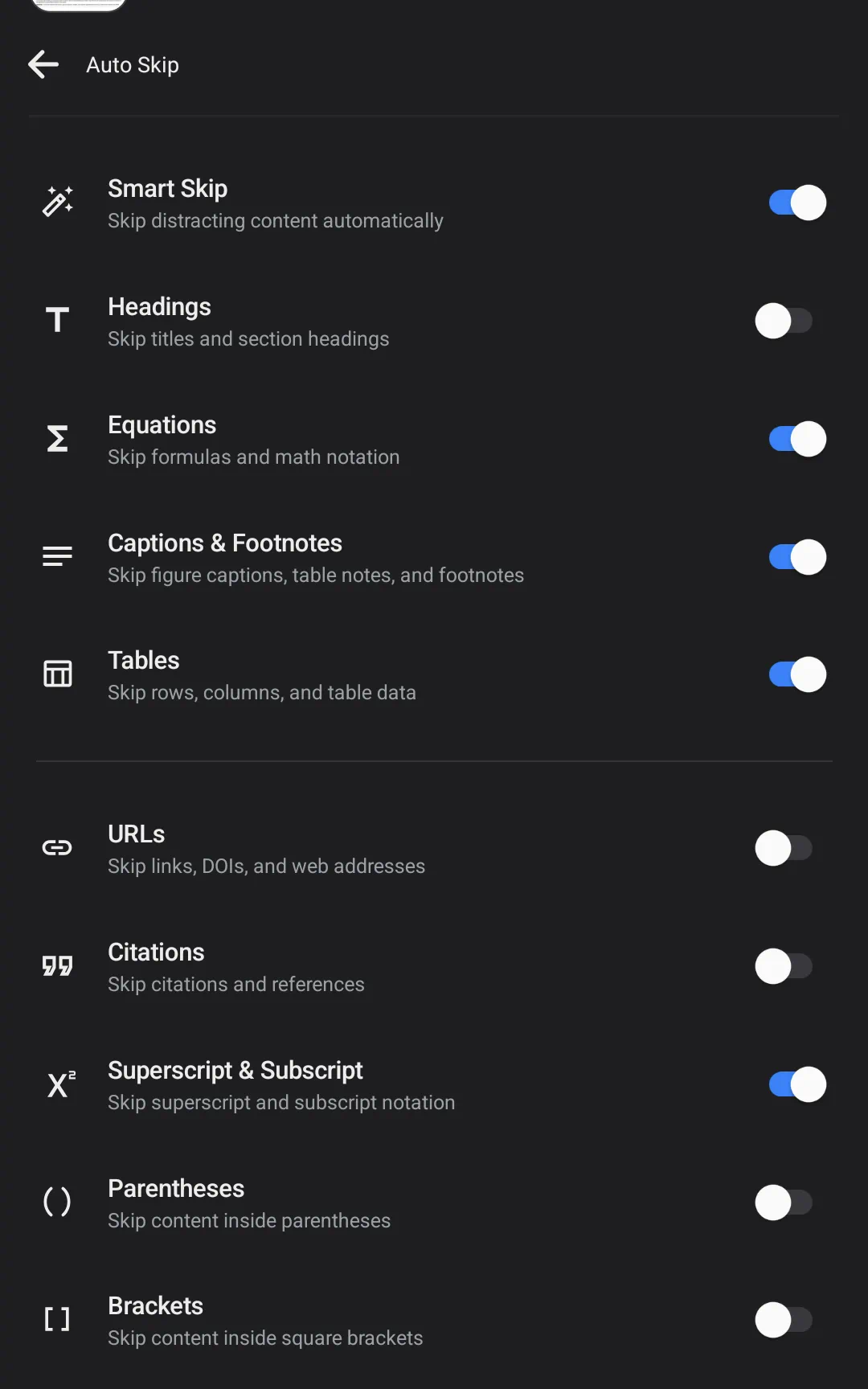
The first section of settings controls the main document structure and layout elements. Bypassing these items helps avoid reading raw structural text:
- Smart Skip: Automatically cleans up recurring document layout noise, such as page numbers printed at margins, repeated title headers, running page footers, and vertical text containers.
- Headings: Skips section titles and section headings, jumping the narrator directly to the start of body paragraphs.
- Equations: Skips complex math formulas, calculations, and raw mathematical notations so the audio doesn't read symbol characters.
- Captions & Footnotes: Skips image captions, figure titles, table descriptions, and bottom-of-page footnotes.
- Tables: Bypasses rows, columns, and grid cell data, preventing raw table spreadsheets from interrupting reading flow.
References & Links Skips
The second section of settings handles academic annotations and hyperlinks that appear inside body text. You can toggle these to prevent mid-sentence narration breaks:
- URLs: Jumps over links, DOIs, and web addresses (such as HTTP links) printed in the middle of sentences.
- Citations: Bypasses reference citations like numerical indexes [14] or parenthetical citations (Smith et al., 2022), letting the narrator speak smoothly through the text.
- Superscript & Subscript: Skips small footnote reference digits and indices appearing above or below text lines.
Parentheses & Brackets Skips
The third section allows you to skip text enclosed inside standard punctuation symbols. This is highly useful for cleaning up references and side notes:
- Parentheses: Skips all text enclosed in round parentheses (like this example).
- Brackets: Skips all text enclosed in square brackets [like this example].
- Braces: Skips all text enclosed in curly braces {like this example}.
Frequently Asked Questions
Will enabling skips delete or hide the text visually?
All document text remains fully visible on your screen. The skips only instruct the text-to-speech engine to skip over the characters during audio playback, allowing you to follow along visually while enjoying uninterrupted listening.
Can I still listen to skipped content if I want to hear it?
Yes. If you want to listen to a section that was skipped, you can tap directly on the skipped text (such as a caption or heading) to jump the audio playback cursor to that spot and play it immediately.
Are my Auto Skip preferences synchronized across my devices?
Your settings are saved directly to your cloud profile. Any customizations you make on the Web Reader are automatically synchronized and loaded when you open the Mobile App.
How do Smart Skips improve the reading experience for academic research papers?
Academic research papers are filled with bracketed numbers, indices, and author-date reference keys (such as Smith & Jones, 2021). Standard voice readers pause mid-sentence to read these details aloud, disrupting your listening flow. By toggling Citations off, Audeus skips references entirely, allowing you to listen to literature reviews and research articles without distraction.
How does the Equations setting handle complex math formulas in textbooks?
Voice narration engines normally read mathematical notation literally, spelling out raw variables, operators, and coefficients. Enabling the Equations setting instructs Audeus to bypass these formulas entirely during audio playback. This allows you to listen to science or math textbooks continuously, focusing on the explanations and body paragraphs instead of raw formula listings.
Will Audeus automatically skip headers, footers, and page numbers on custom PDF document templates?
Yes. The Smart Skip engine uses spatial parsing to locate layout elements on your uploads. Even when reading custom PDF formats, the engine identifies repetitive headers, footer text, and page numbering digits at margins and ignores them during narration, maintaining a clean reading experience.